

To become a Rover sitter, you create a profile, choose your services, pass a background check, and get approved to accept bookings. We’ll cover the whole process and answer pet sitters’ biggest questions about using the app, attracting more clients, and getting repeat bookings.
Can you see yourself pet sitting for Rover?
Most Rover sitters start with zero professional experience and a lot of questions — and that’s totally fine. From flexible side gig to your first step toward becoming a professional pet sitter, popular pet care app Rover has something to offer all kinds of aspiring sitters.
Here’s how to become a sitter for Rover, what to expect during the signup process, and what actually matters to boost your bookings
Why Many Pet Sitters Start on an App (and Why Rover)
Rover is an online marketplace that connects pet owners with pet sitters, walkers, and trainers who live near them. It’s currently the most popular pet sitting app, with over 2 million customers worldwide.
The Rover app does a lot of the start-up work for you, making it an accessible option for beginners. You set your hours and prices, respond to booking requests, and get paid via Rover without investing in your own website or marketing. Rover has some cons for experienced sitters, but if you’re just starting out, it’s one of the easiest ways to start booking gigs quickly.
Pro tip: Rover is the biggest online pet care marketplace, but it’s not the only one.
- Check out our Rover vs Wag review to see the top pet care platforms compared
- Read our Rover app review to read pet sitters’ reviews and learn how the app works.
- Considering alternatives? Our article on the Best Pet Care Business Software shares tips from real pet pros about their favorite business tools.
Before You Apply: What Rover Requires from Sitters
Getting started on Rover is pretty straightforward. Here’s what you’ll need before you apply:
- Be at least 18 years old
- Pass a background check
- Have access to a smartphone and download the free app
- Pay the application processing and background check fees
How much does it cost to become a Rover sitter?
Applicants have to pay a one-time profile review fee of around $49-$79. That includes the cost of processing your application and a background check.
Your exact price is going to depend on:
- Where you live: Background check prices can vary by state
- Type of background check: You can choose the basic check ($10) or splurge on the enhanced check ($35) if you want a special profile badge. If you have the extra budget, it’s a nice sign of trustworthiness for pet parents.
Once approved, your Rover account is free.

How to Become a Sitter for Rover (Step-by-Step)
Signing up for Rover is pretty simple. You can complete most steps in any order, but this is what we’d suggest to work through the process without missing anything. Most sitters finish setting up their profile in an hour or two.
Step 1. Create your account
Head to Rover’s Become a Sitter page and click Get Started. You’ll enter some basic details like your name, email, and location to set up an account.
Step 2. Choose your services and preferences
Next, pick the services you want to offer from Rover’s list of options, including boarding, dog walking, doggy day care, house sitting or drop-ins, dog training, and grooming:
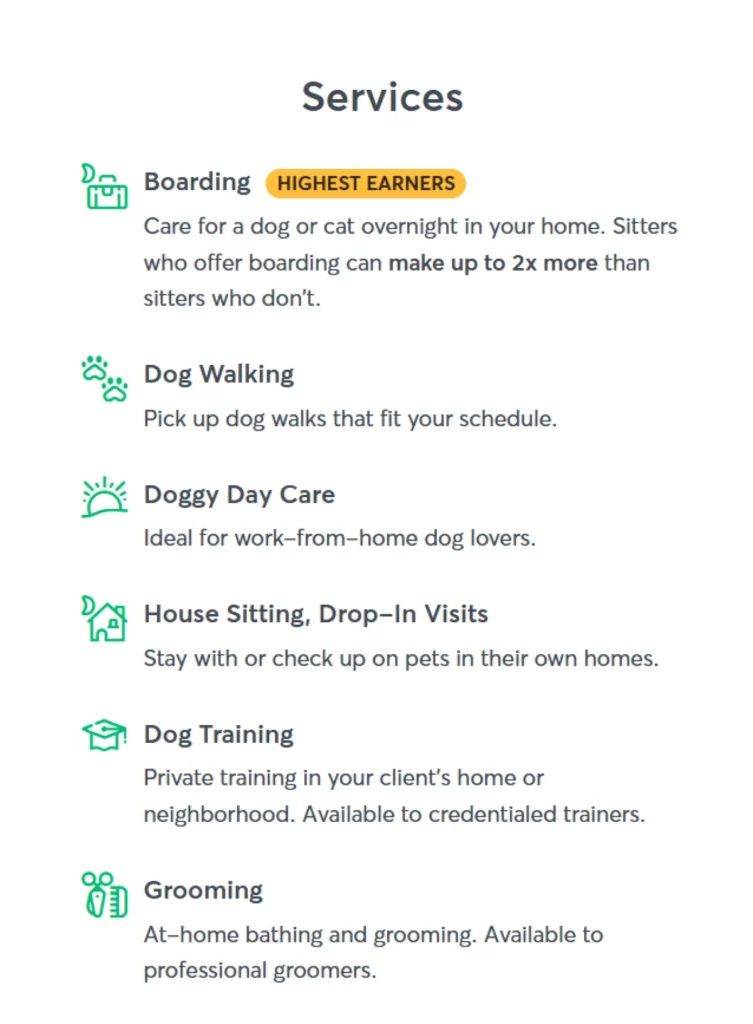
Pro Tip: Start with at least one service. For sitting, that’s usually house sitting (overnight care in clients’ homes) and/or drop-ins (30-60 minute visits in clients’ homes). You can always add more services later once you figure out what works for your schedule and comfort level.
Heads up: pet grooming and dog training services require extra qualifications or certifications.
Step 3. Build your profile
If you only spend extra time on one step, make it this one. Your profile is what makes pet owners decide to book or keep scrolling. That’s why a complete, friendly profile matters more than most new sitters expect (especially to land a first booking).
A profile includes your bio, photos, experience, home details (if you board in your home), and any testimonials you’ve gathered.
What a Strong Rover Profile Looks Like
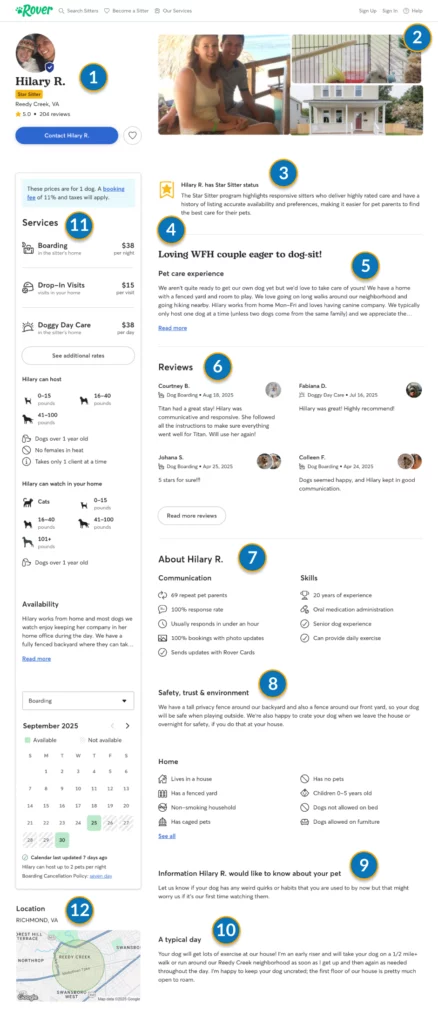
Here’s a real example of what a complete, booking-ready Rover sitter profile looks like, courtesy of PCI-insured pet sitter and dog walker Hilary R.
Want a closer look at all 12 sections? Check out the full Rover profile tutorial.
Step 4. Set your rates and availability
Set your pricing, availability, and service preferences. You can adjust these at any time, so don’t stress about getting it perfect right away. Just be honest about when you think you’ll actually be able to take bookings and the types of pets you’re comfortable with. It’s okay (and even a good thing) to not check every box.
Pro Tip: How much should you charge?
Search for sitters in your area on Rover and check their prices. The goal is for your rates to be competitive, but not so low that it undervalues your time.
Try This: Add the rates of the first 20 local sitters in your search and divide that number by 20 to get the average rate. Then see how many requests you get. Less than you’d like? Lower your prices a bit. More than you can handle? Charge more to target the highest-paying clients.
Step 5. Pass the safety quiz
The pet safety quiz is a mandatory step in how to become a sitter on Rover — but don’t stress about it. Rover provides educational videos as you go and asks questions based on the videos. They cover super-practical topics like avoiding dog escapes, handling greetings between pets, and recognizing signs of distress.
Step 6. Complete a background check and submit your profile
Rover will guide you through the background check process and ask you to review your profile before submitting it for approval. Background checks usually take 3 to 10 business days to come back.
Step 7. Wait for approval
After you submit your profile, Rover will review your application. You should get an email from Rover within 10 to 20 business days. Once you’re approved, your profile goes live, and you can start accepting pet sitting requests.
Can You Become a Rover Sitter With No Experience?
Yes, lots of people become Rover sitters with no professional pet experience.
Rover doesn’t require formal certifications for petting sitting or any experience to apply, so many sitters start exactly where you are. They’ve taken care of their own pets or helped friends and family.
That said, there’s a difference between getting approved and getting booked.
Pet owners are putting a lot of trust in you. So if your profile feels empty or vague, they’ll usually scroll past it to find someone who looks more established. The trick is to provide proof that you’re a responsible and caring pet sitter by showing what you do know.
How to Make Up for Starting from Scratch
If you’re new to pet care, a few simple additions to your profile go a long way:
Add testimonials early
Ask friends, family, or anyone you’ve helped with pet care to write you a quick review. You can request up to 15 testimonials, and we suggest starting with at least four. (That’s the number that shows up on your profile from a client search page.) Even a few thoughtful recommendations make it easier to trust a new sitter.
Use clear, friendly photos
Would you buy something online without seeing a picture? Pet parents feel the same way. Ask a friend to take a headshot of you (the vibe you want is friendly and professional). Add a photo of your house, apartment, or yard to show pet parents that you have a safe, clean, and comfy space for their fur baby.
Bonus points if you use a photo featuring you and your own pet!
Be specific about your experience
You don’t need to exaggerate. Just explain what you have done by sharing dog breeds and sizes that you’ve cared for, or tasks that you’ve completed while watching friends’ pets. If you have a pet with special needs or are used to caring for your own senior pets, puppies, or reactive dogs, share it. That’s experience!
Start with services you're confident in
If you’re nervous about services like overnight stays or caring for multiple pets at once, just start with drop-ins or walks for one pet at a time. You can always expand later, so it’s better to build your skills slowly and safely.
Offer meet-and-greets
A meet-and-greet is a quick 10- to 15-minute visit with a pet owner and their pet before a booking. Many pet owners expect them, but they can be intimidating for first-time sitters.
This is the pet owner’s chance to see if you’re on time, trustworthy, and good with their pet. But it’s also your chance to make sure the details of the booking work for you and check for any concerning pet behaviors like biting, guarding, or lunging before you’re alone with a pet.
Meet-and-Greet Pro Tips from a Rover Sitter
We love this advice from Rover pet pro Hailey Bachman about running a safe and successful meet-and-greet.
@haileymbachman Replying to @Angélique Hope this helps! I’ll put together a list of my questions for you to help answer your other question. 💚 #dogsitting #rover #meetandgreets #questionandanswer ♬ original sound – haileymbachman
Common Questions: What Happens After You’re Approved?
Once your profile goes live, you’re listed alongside other sitters in your area in Rover searches. Pet owners can find you, message you, and request bookings, but you’re not assigned clients automatically.
That’s because Rover is a marketplace. You’re an independent contractor, not an employee, so you’re running your own mini business. That gives you full control of your clients, schedule, services, and pricing, but you’re also responsible for optimizing your profile to get bookings and managing your clients.
Here’s how things actually work once you’re approved, and what you can do to start building momentum.
How to Get Rover Bookings
How does Rover decide who shows up first in searches?
Rover doesn’t publish its exact search page ranking formula, but most sitters see similar patterns. Profiles that are active, responsive, and well-reviewed tend to show up higher in search results. And the higher you are on the search results page, the more pet parents see your profile.
Here’s what you can do to rank higher on the Rover search results page:
- Fill out your entire profile: Sitters with detailed bios, clear photos, and filled-out preferences are more likely to rank higher.
- Respond to requests quickly: Fast response time when a booking request pops up signals to Rover that you’re reliable, available, and really want to take bookings.
- Request reviews and repeat bookings: Positive reviews and returning clients show Rover that you provide excellent service.
- Log in regularly and keep your calendar updated: Regular logins and an up-to-date calendar tells the app you’re actively checking for bookings.
- Match your availability to clients’ needs: Sitters who match pet owners’ most requested times and dates are more likely to get bookings. That can mean holidays, weekends, and early or late slots for working pet parents.
Pro Tip: Don’t expect every client to leave a review unless you request it. A gentle reminder message after a successful booking is smart. Clients might also not know that they can book recurring appointments unless you point it out.
I’m not getting requests. How can I get my first booking faster?
It’s totally normal to wait a few weeks or even months to get your first booking, but you can speed up the process. As a new pet sitter with no completed visits, you’re still building the trust that gets pet parents to click “book.” What your profile needs to give them a push to book is better visibility and more information.
Here are three ideas to help you snag your first booking:
- Confirm your availability daily (pro tip): Clicking “confirm availability” once a day in your Rover calendar moves your profile up in search results. The higher you’re placed, the more likely pet parents will see you.
- Check your prices: When you have no experience, you might need to lower your rates by a dollar or two below average. Once you get your first positive reviews, you can bump the price back up.
- Ask a friend with a pet to book you (discount code hack): Rover gives you a discount code for $20 off a client’s first service. Ask a friend to sign up for Rover and select a drop-in visit using the discount code. Set your drop-in price for under $20, and do the service. When you’re finished, ask your friend to write you an honest review. They get free pet care, and you get your first review.
Once I get a booking request, what do I do next?
First, don’t panic. This is what you’ve been waiting for. Here are the highlights from Rover’s advice about how to communicate with and book a pet parent:
- Read the request carefully: Check the dates, service type, and pet profile to make sure the request works for you. If everything looks good, don’t sit on the request. Reply promptly.
- Message the pet owner via Rover: Ask a few questions if anything’s unclear. This is also your chance to introduce yourself and confirm expectations. Good things to clarify: routines, behavior, and special care needs.
- Schedule a meet-and-greet: Rover recommends meeting first whenever you can. It’s your chance to get to know the pet, the client, and get a sense of whether it’s a good fit for everyone.
- Confirm the booking: When you and the pet owner are ready, either of you can select “Book It Now.” The other person will have a limited time to accept before the request expires.
- Decline or archive if it’s not a good fit: If the request didn’t work for you, let the pet owner know politely and archive it so it doesn’t block your availability.
What pet services can I offer on Rover?
Rover’s main services include things like dog walking, drop-in visits, house sitting, and boarding. You’ll choose at least one of those when you set up your profile, but you can offer multiple types of services.
Beyond the basics, many Rover sitters also customize their service or add small upcharges for customized care. Here are a few common extras sitters might charge for:
- Additional pets: Charge a higher rate for each extra pet in the same household. A fair, easy way to do it is to offer a +$X per pet fee.
- Puppy care: Puppies often need more attention, training, and cleanup, so many sitters set a separate puppy rate.
- Extended time or longer visits: Some sitters offer more time for an added fee.
- Holiday pricing: It’s also common to increase your rates during high-demand periods like holidays or peak travel seasons.
- Special care needs: Senior pets or high-energy dogs may require extra time and attention, which deserves a higher rate.
Rover doesn’t create specific checkboxes for upcharges, but they’re not discouraged. You can usually adjust a price before booking if you and a pet owner agree to it. Just make sure everything is clearly agreed upon in the app (where it’s documented), so there’s no confusion later.
How Pay Works on Rover
How do I get paid on Rover?
Rover will collect the client’s payment and release your pay two days after the service is complete. Pay can be direct-deposited into your bank account, or you can get paid via PayPal.
The upside is that you don’t have to worry about invoicing, handling cash, or chasing payments. The downside is that Rover takes a 20 percent commission fee, so the amount you receive will be slightly lower than your listed rate
How much do Rover sitters usually make?
Rover pet sitters set their own rates, so earnings can vary a lot based on your location, services, and how often you book clients. That said, reported earnings for house sitting and pet boarding on Rover tend to fall between $35 to $100 per night.
Part-time sitters might earn a few hundred dollars per month. If you’re more consistently booking visits, you might earn $1,000+ a month. But most sitters don’t earn a full-time income just from Rover, unless they live in a larger city with a lot of demand.
Better profiles and repeat clients usually lead to higher rates and more bookings, but location also plays a huge role.
Does Rover allow tipping?
Yes, Rover allows tipping, but it’s optional for pet owners. That means that some of your clients will tip generously, and, honestly, some won’t tip at all. It’s best to charge the rate you genuinely want to make and not rely on tips to make up a big portion of your earnings.
How does Rover’s commission fee work?
Rover takes a 20 percent commission fee from each booking you make, so you won’t keep 100 percent of what you charge. If you charge $100 for that boarding job, expect to actually take home about $80.
Many Rover sitters account for this by adjusting their base price. (For example, if you wanted to make $100 on a booking, you’d need to charge $125).
Beginner Mistakes on Rover That Can Slow You Down
If you’re new to Rover, these common mistakes can make it harder to get bookings, or lead to awkward situations with clients. Skip the rookie mistakes and go straight to confidently booking visits with these quick tips:
| Common Mistakes | Why It's a Don't |
|---|---|
|
❌ Incomplete or vague profile |
Pet owners often skip a profile that’s unclear on experience or service details |
|
❌ Ignoring requests or responding too slowly |
Pet parents often send requests to multiple sitters for the same job, so fast replies help you get booked. |
|
❌ Not setting expectations with clients |
Miscommunication about timing, care routines, and house rules are some of the leading causes of bad reviews. Talk details early. |
|
❌ Saying yes to every request |
Don’t book jobs you’re not comfortable with, whether that’s the behavior history of the pet, the safety of the home, or the service requested. |
|
❌ Skipping meet-and-greets |
Meet-and-greets are a chance to connect with your client and become their go-to sitter. Repeat bookings are where you’ll find the real money on Rover. |
|
❌ Assuming Rover covers everything |
Many sitters assume Rover will protect them if a pet gets hurt or they break a vase, but that’s a mistake. Have your own plan for handling risks with pet sitting insurance. |
Once you know what you’re looking for, these mistakes are all easy to avoid with a little preparation and thoughtfulness about what you want to get out of sitting for Rover.
How to Get Repeat Bookings
Getting your first booking is a big win. Your next job: turning one-off bookings into recurring visits. This not only creates a more consistent schedule and income, but you’ll make a lot more with regular clients who skip the Rover search and go straight to your page.
Trust and professionalism are the secret ingredients for getting rebooked on Rover, and they’re the same ones you’ll need if you ever decide to start your own pet sitting business. Here are a few easy ways to stand out as a go-to sitter and build a client base:
Report beyond basics
Don’t just check the boxes on your Rover Card. Add updates with details about each pet. You could even send a personalized thank-you after a successful sit.
Share photos & videos
Regular updates help pet parents know their fur baby is safe and happy. Snap a shot of their pet playing with a favorite toy or enjoying an owner-approved treat.
Be on time & reliable
Showing up when and where you say you will is one of the fastest ways to demonstrate that this is a serious job for you, not just a hobby.
Respect their home
Clean up after pets and yourself, and follow clients’ feeding and house rules exactly. Always ask about preferred cleaning products, just in case.
Use the rebook feature
If a client mentions wanting to book you again for a specific date, hit the Rebook button in your Rover inbox to start their new request. It saves their time and makes rebooking painless.
Sell recurring services
Clients with ongoing needs may not know they can auto-book sitting or drop-ins on Rover. Walk your client through the process, or send them to Rover’s recurring service help page.
Over time, these habits help you build a reputation of trustworthiness and professionalism. You’re doing more than one-time sitting gigs now — you’re actually becoming a professional pet sitter.
What the Rover Guarantee Covers (and What It Doesn’t)
This is the part a lot of new sitters don’t think about until something goes wrong. What if a dog swallows his toy? Or a cat sneaks out a window? Or you break a client’s garbage disposal?
Stuff happens sometimes in home pet care, even if you’re careful. That’s why any professional pet sitting business has insurance, but that might not occur to you as a new sitter.
Here are the basics every Rover sitter needs to know:
- Rover offers a reimbursement program called the Rover Guarantee, not insurance. It’s designed to offer limited protection during bookings made through Rover only.
- The Rover Guarantee primarily protects pets and pet owners. Its main goal is to give pet parents peace of mind, so it may pay costs like vet bills and client property damage. But, because it’s not really designed to protect you first, there are serious gaps where common pet accidents can fall back on you.
- Dog sitting insurance is designed to protect you and pets. To cover the spots where the Rover Guarantee leaves you vulnerable, it’s smart to buy your own insurance, like PCI’s pet sitter policy. This covers all the essentials, like injuries and property damage to other people, harm to pets in your care, vet bills, and even lost keys.
What the Rover Guarantee Doesn’t Cover (& How Pet Sitting Insurance Can Help)
| What Rover doesn't cover | Scenario | How Pet Sitting Insurance covers it |
|---|---|---|
|
Damage to the pet owner’s property by their own pet |
Koda spots a cat outside and runs right through the client’s closed glass storm door. Rover might pay for the vet costs, but they’re probably not paying for that door — you are. |
|
|
Vet costs resulting from a preventable, chronic, or breed-specific illness |
Sugar has a history of seizures and has an episode during your drop-in visit. You rush her to a vet. Rover likely wouldn’t cover vet bills related to this pre-existing condition. |
|
|
Injuries or damage during a meet-and-greet |
You accidentally break a client’s gate latch during a meet-and-greet visit. Since it’s outside the scheduled booking hours, Rover wouldn’t cover this. |
|
|
Any bookings made outside of Rover |
A repeat client texts you outside the app and says they’ll pay cash if you sit last-minute. During the job, Daisy hurts her leg while playing in the yard. Rover wouldn’t cover any resulting costs because the job wasn’t booked in their app. |
|
|
Long-term vet care costs (beyond 30 days) |
Zeke sneaks out the door as you get to a client’s home and runs right into traffic. His injuries are severe, and treatment is ongoing. Rover stops paying after 30 days of care, then those costs fall to you. |
|
|
Any losses resulting from theft |
Your bag with the pet owner’s spare key inside gets stolen at a gas station. Rover likely isn’t paying for any resulting costs, like rekeying the client’s house. |
|
|
Damage to or theft of your equipment (including work tech, pet gear, etc.) |
Butterbean bumps your elbow while you’re taking an update photo, and your work phone goes flying. Rover isn’t paying for any repairs to your stuff, even if you use it just for pet sitting. |
|
|
Injury to the pet owner, their relative, or their roomate |
A pet owner’s cousin stops by during your drop-in visit with Rex. Rex bites her, and she sues you to pay her medical bills. Rover isn’t covering this because the injured party is related to the pet owner. You’re on your own to cover legal fees and medical bills. |
Damage to the pet owner’s property by their own pet
Example: Koda spots a cat outside and runs right through the client’s closed glass storm door.
Rover might pay for the vet costs, but they’re probably not paying for that door — you are.
How Pet Sitting Insurance covers it: General Liability Coverage
Vet costs resulting from a preventable, chronic, or breed-specific illness
Example: Sugar has a history of seizures and has an episode during your drop-in visit. You rush her to a vet.
Rover likely wouldn’t cover vet bills related to this pre-existing condition.
How Pet Sitting Insurance covers it: Veterinarian Reimbursement
Injuries or damage during a meet-and-greet
Example: You accidentally break a client’s gate latch during a meet-and-greet visit.
Since it’s outside the scheduled booking hours, Rover wouldn’t cover this.
How Pet Sitting Insurance covers it: General Liability Coverage
Any bookings made outside of Rover
Example: A repeat client texts you outside the app and says they’ll pay cash if you sit last-minute. During the job, Daisy hurts her leg while playing in the yard.
Rover wouldn’t cover any resulting costs because the job wasn’t booked in their app.
How Pet Sitting Insurance covers it: Pet Protection (Animal Bailee) Coverage
Long-term vet care costs (beyond 30 days)
Example: Zeke sneaks out the door as you get to a client’s home and runs right into traffic. His injuries are severe, and treatment is ongoing.
Rover stops paying after 30 days of care, then those costs fall to you.
How Pet Sitting Insurance covers it: Pet Protection (Animal Bailee) Coverage
Any losses resulting from theft
Example: Your bag with the pet owner’s spare key inside gets stolen at a gas station.
Rover likely isn’t paying for any resulting costs, like rekeying the client’s house.
How Pet Sitting Insurance covers it: Lost Key Liability Coverage
Damage to or theft of your equipment
Example: Butterbean bumps your elbow while you’re taking an update photo, and your work phone goes flying.
Rover isn’t paying for any repairs to your stuff, even if you use it just for pet sitting.
How Pet Sitting Insurance covers it: Equipment and Inventory (Inland Marine) Coverage
Injury to the pet owner, their relative, or their roommate
Example: A pet owner’s cousin stops by during your drop-in visit with Rex. Rex bites her, and she sues you to pay her medical bills.
Rover isn’t covering this because the injured party is related to the pet owner. You’re on your own to cover legal fees and medical bills.
How Pet Sitting Insurance covers it: General Liability Coverage
*These scenarios are examples, not an exhaustive list of all covered and uncovered incidents. They’re also not a guarantee of coverage in every similar situation. See the Rover Guarantee terms and conditions and PCI’s coverage details.
Insurance isn’t required to work on Rover, but given that many of the common scenarios above can cost thousands, it’s risky to pet sit without coverage. (P.S. Pet parents also love seeing “insured pet sitter” on your Rover profile as a sign that you’re prepared and professional.)
Thinking about getting covered? PCI’s pet sitting insurance includes simple, affordable coverage designed just for sitters to cover your biggest risks and help you care for pets confidently.
Pro Tip: Check out our Insurance Guide for Rover Professionals for more about your risks as a Rover sitter and how to protect yourself for no-stress pet care.

The Final Word: Is Becoming a Rover Sitter Worth It?
So, all things considered, is pet sitting on Rover right for you? It really depends on what you want out of the app.
| Pros of Sitting on Rover | Cons of Sitting on Rover |
|---|---|
|
Flexible schedule |
Competitive |
|
Low barrier to entry |
You’re responsible for your own risk |
|
Set your own pay rates |
No guaranteed income |
|
Easy way to get pet sitting experience, meet clients, and book visits |
Must follow Rover’s rules, use their platform, and pay the 20 percent commission fee |
Overall, Rover is a fast and easy way for sitters to break into pet care, earn extra cash, and test out whether they enjoy pet sitting as a job. While many sitters eventually leave the platform to start their own business, Rover can still be a great fit as a side gig for animal lovers or the start of your pet care journey.
FAQs: How to Become a Sitter on Rover
Can I do Rover part-time?
Yes, Rover is designed to be flexible and is best suited to part-time work or a side gig for most people. You can set your own schedule, choose your services, and decide when you’re available. Many sitters use Rover as a side gig on evenings, weekends, or around a full-time job.
Do I need insurance to work on Rover?
No, insurance isn’t required to work on Rover, but it’s risky to pet sit without coverage. The platform offers some protection via the Rover Guarantee, but this program has some crucial gaps for sitters.
Your own coverage tailored to your needs can cover common risks that the Rover Guarantee can’t, like pets damaging a client’s property, pet illness during care, or accidents during a visit booked outside the app.
What’s the difference between Rover and Wag for pet sitters?
Both Rover and Wag connect pet owners with sitters, but they work a little differently. See our Rover vs Wag comparison for a full head-to-head, but here are the key differences:
- Client base: Rover has roughly 2 million users worldwide, while Wag is more niche, with a little under 700,000 users in the U.S.
- Commission fee: Rover takes a 20% commission from your bookings, while Wag takes a 40% commission.
- Service focus: Rover is best known for pet sitting and boarding, while Wag is best known for on-demand dog walking. You can still offer roughly the same services on both apps, though.
- Client matching: Clients send booking requests directly to their chosen sitter on Rover. On Wag, pet sitters can be more proactive by bidding on posted sitting jobs, or they can wait for the app to match them with booking requests.
