

At first, many pet care businesses run on pure hustle. You have feeding instructions in your phone, appointments in your head, and maybe a spreadsheet if you’re feeling organized. It works… until it doesn’t.
As your client list grows, so does the complexity of managing your business. Booking, client records, and invoices pile up, and suddenly, you’re spending more time on admin than pets. To understand what actually works, we asked pet business owners across Facebook communities which software they rely on to run their businesses.
In this guide, we’ll break down:
- The best software for different pet services (sitting, walking, grooming, etc.)
- How to compare popular tools to evaluate your options fast
- Real insights from pet business owners on what works and how they use it
- Tools for each stage of growth, so you don’t overspend or underplan
- A simple framework for choosing software and how to build your tool stack
The Busy-Day Summary
Pet care business software are digital tools that help you run the daily operations of your business. They’re often used by pet sitters, dog walkers, groomers, and boarding businesses to manage booking, billing, and client communication.
Which Features Matter Most to Pet Pros
After asking 45 pet business owners, we found that the software features most important to pet professionals are:
- Scheduling and booking
- Client and pet records (profiles, visit reports, notes)
- Marketing tools
- Invoicing and payments
- Reminders and communication
Time to Pet was the most frequently recommended platform (1 in 3 pet pros suggested it). But the right tools for you depend on your services and your stage of business growth.
Best Pet Care Business Software: Quick Picks by Use Case
The best pet business software really depends on the type of services you offer and how complex your daily operations are. Here’s the at-a-glance breakdown.
| Software Pick | Best For | Why It Stands Out |
|---|---|---|
|
Time To Pet |
Multi-service care businesses (especially sitting and walking) |
Most recommended by pet pros. Easy, all-in-one system to manage multiple services, like walks, drop-ins, and overnights. |
|
Precise Petcare |
Pet sitting and dog walking |
A strong alternative for sitters and walkers who want more customization in scheduling and operations. |
|
MoeGo |
Pet grooming |
Designed for grooming, including appointments and tracking grooming history. |
|
Gingr |
Pet boarding, training, and daycares |
Built for managing multiple pets, staff, and space, with tools for capacity and facility operations. |
|
Square (Appointments) |
Beginners and simple setups |
Easy to use and widely adopted for payments before moving to full pet business software. |
|
A personalized software stack (ex: Time To Pet + QuickBooks integration) |
Growing and scaling businesses |
How mid-size pet businesses really operate. Combine operations tools with financial tracking or marketing to support growth without abandoning what works. |
Time To Pet
Best for
Multi-service care businesses (especially sitting and walking)
Why It Stands Out
Most recommended by pet pros. Easy, all-in-one system to manage multiple services, like walks, drop-ins, and overnights.
Precise Petcare
Best for
Pet sitting and dog walking
Why It Stands Out
A strong alternative for sitters and walkers who want more customization in scheduling and operations.
MoeGo
Best for
Pet grooming
Why It Stands Out
Designed for grooming, including appointments and tracking grooming history.
Gingr
Best for
Pet boarding, training, and daycares
Why It Stands Out
Built for managing multiple pets, staff, and space, with tools for capacity and facility operations.
Square (Appointments)
Best for
Beginners and simple setups
Why It Stands Out
Easy to use and widely adopted for payments before moving to full pet business software.
A personalized software stack (ex: Time To Pet + QuickBooks integration)
Best for
Growing and scaling businesses
Why It Stands Out
How mid-size pet businesses really operate. Combine operations tools with financial tracking or marketing to support growth without abandoning what works.
*Full disclosure: Time To Pet is a PCI partner. We partner with and recommend Time To Pet because so many PCI pet pros actively use it, not the other way around.
Paw-norable Mentions
These tools didn’t come up as often in our conversations with pet pros, but they’re still strong contenders that appear often on industry lists (especially for businesses that run facilities). If they sound like a good fit for you, it might be worth a look:
- Paw Partner: A newer, fast-growing platform designed for boarding, daycare, grooming, and multi-service businesses. Not as well-established as MoeGo or Gingr, but it has strong reviews and adoption among small pet businesses with facilities.
- DaySmart Pet (formerly 123Pet): An all-in-one platform most popular for grooming salons and high-volume, multi-service pet businesses. It’s likely overkill for beginners, but established pros may appreciate the marketing tools and loyalty program management.
"What About Pet Care Apps? Are Rover & Wag Good Pet Business Sofware Tools?"
Rover and Wag aren’t traditional pet business software. They’re online marketplaces that connect you with clients and handle bookings for you, but they do include some built-in features like messaging, scheduling, and pet report cards.
The tradeoff is control. You’re limited to the platform’s basic system, and both apps take a cut of every job you book. Rover and Wag are popular starting points for solo pet pros to build experience or find clients. But many eventually leave the platform and move to using their own software as they grow.
Considering starting on a pet care app? Check out:
Ready to find software for your independent pet business? Keep reading.
Pet Care Business Software Comparison (Features, Pricing, & Ease of Use)
Here’s a closer look at popular software options in pet care.
| Tool | Key Features | Ease of Use* | Starting Price* | Free Trial |
|---|---|---|---|---|
|
Scheduling + booking Client + pet profiles Invoicing + payment processing Client messaging Visit report cards Staff app + GPS tracking |
Easy 4.7/5⭐on Capterra |
$25/month |
✅ |
|
|
Scheduling + booking Client management (report cards + service confirmations) Invoicing Mobile access for visits and updates Live GPS sitter tracking + staff dispatching tools |
Moderate 4.1/5⭐on Capterra |
$20/month |
✅ |
|
|
Scheduling + booking (automatically limits driving time for mobile groomers) Grooming histories Auto reminders Two-way messaging + mass texts Digital client agreement Integrated payment |
Easy 4.7/5⭐on Capterra |
$49/month |
✅ |
|
|
Kennel/capacity management Staff scheduling Vaccination tracking Business reporting Booking + notifications Integrated payments |
Moderate 4.4/5⭐on Capterra |
Groomers and trainers: Daycares: Boarders: |
✅ |
|
|
Payment processing (POS) Invoicing Basic online booking Simple scheduling Appointment reminders |
Easy 4.5/5⭐on Capterra |
Free version for solo pros Team plans starting at $49/month |
✅ |
Time To Pet
Key Features
Scheduling + booking
Client + pet profiles
Invoicing + payment processing
Client messaging
Visit report cards
Staff app + GPS tracking
Ease of Use*
Easy
4.7/5 ⭐on Capterra
Starting Price**
$25/month
Free Trial
✅
Precise Petcare
Key Features
Scheduling + booking
Client management (report cards + service confirmations)
Invoicing
Mobile access for visits and updates
Live GPS sitter tracking + staff dispatching tools
Ease of Use*
Moderate
4.1/5 ⭐on Capterra
Starting Price**
$20/month
Free Trial
✅
MoeGo
Gingr
Square (Appointments)
Key Features
Payment processing (POS)
Invoicing
Basic online booking
Simple scheduling
Appointment reminders
Ease of Use*
Easy
4.5/5 ⭐on Capterra
Starting Price**
Free version for solo pros
Team plans starting at $49/month
Free Trial
✅
* Insights drawn from Capterra ease of use user and client rankings in April 2026.
** Pricing varies based on features, number of users, and business size. Base pricing is accurate as of April 2026.

Which Software Pet Businesses Actually Use: Data-Backed Insights
To understand how pet care business software gets used in the real world, we asked 45 pet professionals across multiple Facebook communities what tools they use to run their businesses.
While there wasn’t a single “perfect” platform, a few patterns stood out. Some tools came up again and again, and many pet pros shared ways they combine software to manage admin.
Pet Pros’ Most Recommended Business Tools
Across responses, a handful of tools showed up more often than others:
- Time To Pet is the most recommended platform by far (about 1 in 3 responses), especially among pet sitters and dog walkers.
- QuickBooks is the most mentioned choice for invoicing, expense tracking, and financial management.
- MoeGo and Gingr were the most commonly mentioned platforms for grooming, boarding, and daycare.
There are plenty of options out there (the pet pros we talked to named 40 separate tools), but the most-mentioned platforms make a strong starting point.
3 Key Patterns: How Pet Businesses Use Software
Beyond specific recommendations, trends in the way pet pros use their software revealed real-world strategies for getting the most out of your money and time.
Pattern #1: Most Pet Businesses Use More Than One Tool
Pet care software providers love advertising all-in-one solutions. Some pet businesses love that, too, but one in four pet pros we talked to didn’t rely on a single tool. Instead, they build a simple system of multiple tools that works for them. Think of it as a personalized software stack.
This approach lets businesses grow without needing a single expensive, complex tool. Instead, they can “stack” inexpensive, simpler tools to create systems that fit their needs.
Pattern #2: Different Pet Services Require Different Features
Plenty of software tools claim to serve every type of pet business, but there were clear patterns in who liked which tools most. That’s because different services need different features.
- Pet sitters, dog walkers, and pet taxis manage many individual visits across locations, so they need strong accountability and communication tools.
- Groomers operate more like a salon, so they need appointment-based workflows and service tracking. (See Best Grooming Software for a deep-dive on top options.)
- Boarding and daycare businesses get complex with multiple pets in one location, so they need capacity and staff management.
- Dog trainers who work solo or do home visits have similar needs to pet sitters. Those who run training facilities have similar needs to daycare businesses.
Most Important Software Features by Pet Service
| Pet Sitters, Dog Walkers, and Pet Taxis | Groomers | Boarding and Daycare |
|---|---|---|
|
Flexible scheduling and route planning |
Appointment scheduling by service (bath, full groom, add-ons) |
Capacity and kennel management (how many pets you can accommodate) |
|
Client and pet profiles (feeding instructions, behavior notes, vet info) |
Time blocking and availability management |
Staff scheduling and coordination |
|
Visit report cards and updates (photos, videos, notes system for clients) |
Pet grooming history (notes on coat conditions, preferences, past service) |
Vaccination, signed boarding agreements, and record keeping |
|
Invoicing and payments |
Automated reminders and confirmations |
Multi-day booking management |
|
Client and staff check-ins (messaging, booking requests, appointment reminders, GPS tracking) |
Integrated payments with support for tipping |
Reporting and business insights (occupancy, revenue, usage) |
Pet Sitters, Dog Walkers, and Pet Taxis
- Flexible scheduling and route planning
- Client and pet profiles (feeding instructions, behavior notes, vet info)
- Visit report cards and updates (photos, videos, notes system for clients)
- Invoicing and payments
- Client and staff check-ins (messaging, booking requests, appointment reminders, GPS tracking)
Groomers
- Appointment scheduling by service (bath, full groom, add-ons)
- Time blocking and availability management
- Pet grooming history (notes on coat conditions, preferences, past service)
- Automated reminders and confirmations
- Integrated payments with support for tipping
Boarding and Daycare Businesses
- Capacity and kennel management (how many pets you can accommodate)
- Staff scheduling and coordination
- Vaccination, signed boarding agreements, and record keeping
- Multi-day booking management
- Reporting and business insights (occupancy, revenue, usage)
Pattern #3: Software Becomes Essential as Pet Businesses Grow
Many pet professionals start with simple systems and free tools. But as their client list grows, so does their need for better organization.
Scheduling, communication, and invoicing quickly become too much to manage manually, which is usually when pet pros make the switch to dedicated business software. We noticed three major ways pet pros were using software, each tied to a different step in their business growth.

The Best Pet Care Business Software for Each Stage of Growth
What works when you’re just starting out won’t necessarily work once you have thirty clients and a team to manage. Here’s how we saw pet care businesses using their software at each stage of growth.
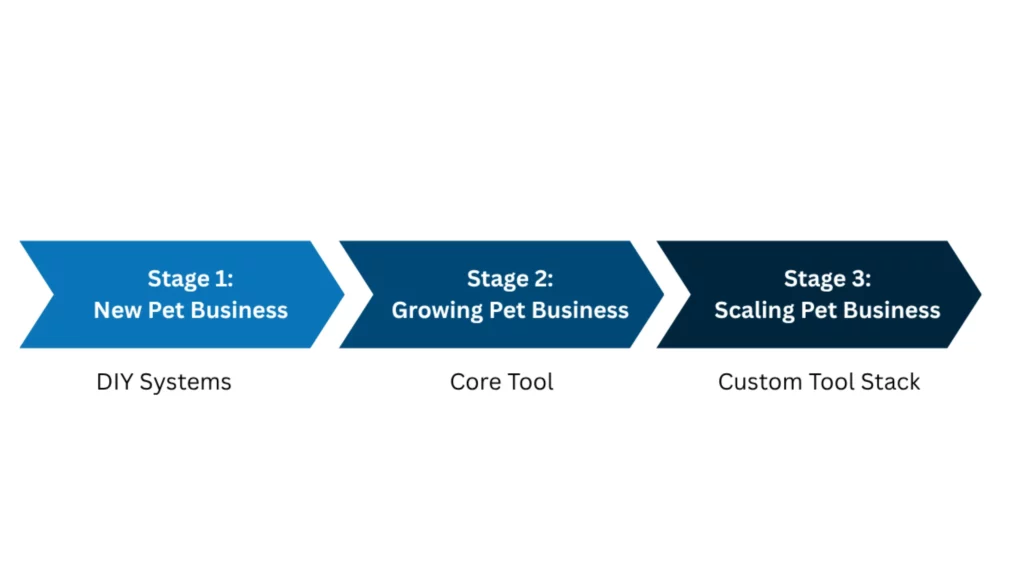
Stage 1: New Pet Business (Simple, Free, or DIY Systems Work)
When you’re just starting out, your focus is on getting clients and building routines. Plenty of beginning pet pros rely on free tools and even manual systems to keep things running. You’re likely working solo, so you haven’t needed to build systems for a team, just for yourself.
One person we talked to uses paper spreadsheets in three-ring binders to track pet vaccinations, and honestly, if it works, it works.
Common Pet Care Business Software & Tools for New Pet Pros
| Business Needs | Tools Pet Pros Use |
|---|---|
|
Tracking appointments |
Google Sheets |
|
Storing basic client and pet information |
Paper records or notebooks |
|
Taking payments |
|
|
Making flyers or business cards |
|
|
Communicating with clients |
Your personal phone/text |
When to consider upgrading:
- You’re double-booking or missing appointments
- Client details are scattered across apps and notes
- Admin work is starting to take up too much time
Stage 2: Growing Pet Business (All-in-One Software Becomes Vital)
As your client list grows, so does the complexity of running your business. You’re likely juggling more appointments, more communication, and more admin than you can easily manage on your own. Your current systems are starting to break down.
This is the stage when software starts to feel like a lifeline. Instead of piecing together notes and tools, many pet pros switch to a single platform to keep most things in one place.
Pro Tip: This is also when many pet pros become aware of cyber liability and data security risks, making it essential to move to more secure systems.
| Business Needs | Tools Pet Pros Use |
|---|---|
|
Manage a full schedule of appointments |
Google Sheets |
|
Keep client and pet info organized |
|
|
Send visit updates or communicate with clients |
|
|
Automate reminders to reduce no-shows |
|
|
Handle invoicing and payments in one place |
|
|
Separate business and personal calls or texts
|
When to consider upgrading:
- You’re planning to grow your team
- You need better visibility into your finances or performance
- Your current system can’t keep up with booking volume
- You’re adding new services or expanding your business
Stage 3: Scaling Business (Core Tool + Customized Stack)
As your business grows beyond just you, your needs change again. You may be managing a team, handling higher booking volume, maintaining a facility, marketing more heavily, or trying to get a clearer picture of your finances.
At this stage, many pet businesses move beyond a single platform. Combining tools that each handle a specific part of the business well lets you support how your business actually runs.
Pro Tip: You can also check your software for integrations that let you connect external tools to your main platform. Not every program is supported with an integration, but some of pet pros’ favorites, like QuickBooks and Google Calendar, are common across platforms.
| Business Needs | Tools Pet Pros Use |
|---|---|
|
Coordinate schedules and manage teams |
Time To Pet + integrations |
|
Track revenue, expenses, and profitability |
|
|
Manage larger client volumes and operations |
Paw Partner |
|
Support marketing and social media |
Canva Pro (design) |
|
Email marketing and automation |
|
|
Mileage tracking |
|
|
Internal team communication |
|
|
Digital records and forms |
No one understands your business needs better than you do. By developing a custom software stack, your processes actually support sustainable growth.
How to Build Your Own Pet Business Software Stack
To build a software setup that fits how your business runs:
- Make a list of admin tasks you want to streamline
- Identify a core software platform that covers most of those tasks
- Map what that platform can and can’t do onto your task list
- Fill in the gaps with simpler tools or integrations
Example Pet Business Software Stacks
Here are four real software stacks pet pros shared with us.
Budget-Friendly Starter Stack
Core: DogWalkerCentral
Accounting: QuickBooks
Classic Pet Sitter Software Stack
Core: Time To Pet
Accounting: QuickBooks
Full-Service Pet Business Stack
Core: Time To Pet
Scheduling: Calendly, Google Calendar
Email: Proton Mail
Accounting: QuickBooks
Client Communication: Quo
Advertising: Canva
Built-to-Scale Software Stack
Core: Time To Pet
Team Communication: Pumble
Team Payroll: OnTheClock
Mileage Tracking: MileIQ
Email: Mailchimp
Advertising: Canva
Which Features Actually Matter Early On?
When we looked at what pet pros actually mentioned using and loving, the most common features were operational.
- Operational = what you need to actually work day-to-day
- Advertising, financial reporting, and analytics = what helps you grow or optimize your business
This tells you a lot about which tools are must-haves right away, and which don’t matter as much if you’re just starting out.
Business Software Features Pet Pros Prioritize
| Feature | Percentage of Responses | Purpose |
|---|---|---|
|
Scheduling and booking |
24% |
Operational |
|
Client and pet records (profiles, report cards, visit reports) |
18% |
Operational |
|
Marketing tools (social media scheduling, email marketing, ad design) |
11% |
Advertising |
|
Payments and invoicing |
11% |
Operational |
|
Client and team communication (messaging, automated reminders) |
8% |
Operational |
|
Mileage tracking |
7% |
Financial Reporting |
Scheduling and booking
Client and team calendars, booking and appointment creation
Percentage of Pet Pro Responses: 24%
Purpose: Operational
Client and pet records
Client and pet profiles, report cards, visit reports
Percentage of Pet Pro Responses: 18%
Purpose: Operational
Marketing tools
Social media scheduling, email marketing, ad design
Percentage of Pet Pro Responses: 11%
Purpose: Advertising
Payments and invoicing
Payment portal, invoicing and records
Percentage of Pet Pro Responses: 11%
Purpose: Operational
Client and team communications
Messaging, automated reminders
Percentage of Pet Pro Responses: 8%
Purpose: Operational
Mileage tracking
Percentage of Pet Pro Responses: 7%
Purpose: Financial Reporting
How to Choose the Right Pet Care Business Software
Pet pros tend to worry about not investing in the “best” business software and regretting it later, but choosing tools doesn’t have to be complicated. Try this simple decision framework to narrow down your options.
Step 1: Match Your Services to the Right Tools
Before comparing tools, save yourself some time by eliminating platforms that don’t fit your pet services.
Sitters, walkers, pet taxis, solo trainers → scheduling, client updates, visit reports
Groomers → appointment-based scheduling and service tracking
Boarding, daycare, training facilities → capacity management and staff coordination
Step 2: Consider Your Stage of Growth
Prioritize pet business software that fits the complexity of your business right now. There’s no pressure to skip ahead. Choose what fits your current needs. You can add integrations, buy a different package, or update your tool stack later as needed.
Just starting out → simple tools or basic systems
Growing → all-in-one software (like Time To Pet or Precise Petcare)
Scaling → a combination of tools
Step 3: Focus on Your Daily Admin Problems First
Instead of trying to find a tool that does everything, start with what’s causing you the most stress. Remember that features targeting daily operations will give you the biggest bang for your buck starting out.
Ask yourself:
- Am I struggling to keep track of appointments?
- What part of business management is taking the most time right now?
- Is invoicing or getting paid a challenge?
Step 4: Check for Ease of Use for You and Your Clients
If you want clients to use your new software, too, it has to be easy to use. If they struggle to book appointments, receive updates, or communicate with you, new business software can create more problems than it solves.
Check the reviews of software you’re considering for things like ease of use and user experience (UX).
Step 5: Test Before You Commit
Most pet care software platforms offer free trials or demos. Take advantage of them. The best way to know if a tool works for you is to actually use it.
- Try booking appointments
- Send test invoices
- Explore the client experience
Step 6: Check for the Ability to Grow and Evolve
You’re much more likely to use business software longer if it’s designed to upgrade as your business scales. Check for:
- An integrations list
- Account upgrade options for larger teams or more users
- Flexibility to add features later
Software should make your business feel easier to run, not more complicated. Choosing tools always feels a little daunting. But when you find something that lightens your admin load and helps you relax, you’ll wonder why you waited so long.
Support Business Growth with Software and Insurance
Software is one way to create professionalism and structure around your business. Pet business insurance is another.
Liability coverage for animal injuries, property damage, and more is a tool most thoughtful pet businesses use. It protects you during the pet care side of your job, and it boosts your credibility. Just like an orderly booking system, an insurance badge on your website or app tells pet owners that you’re a professional.
Different pet services come with their own built-in risks, and that means you need a policy that lets you customize your coverage stack. Check out PCI’s coverage options to find the right fit for your business.
Curious if pet business insurance is right for you? See if you qualify.

Common Questions About Pet Care Business Software
What is pet care business software?
Pet care business software includes tools that help you manage the day-to-day operations of your pet service, like scheduling appointments, tracking client and pet information, sending updates, and handling payments. It’s designed to keep everything organized, so you can spend less time on admin and more time caring for pets.
How much does pet business software usually cost?
Most pet care business software tools cost between $15 and $50 per month for solo operators, with high pricing for larger teams or advanced features. Some tools offer free plans or trials, while others use custom pricing based on your business size or needs.
What software features matter most for pet businesses?
The most essential features are operational tools that help you run your business daily, including scheduling, client and pet records, invoicing, and communication. Other features, like marketing tools and financial reporting, can be helpful as you grow, but aren’t essential at first.
What if I work for Rover or Wag? Do I still need my own software?
If you work through Rover or Wag, you may not need additional software right away, since those platforms handle bookings, payment, and communication. However, if you plan to build an independent business, having your own software gives you more control, flexibility, and long-term growth potential.
Are there any risks to using pet business software?
Software helps you organize client info, but it’s important to manage your cybersecurity risks. Look for tools that provide secure data storage, encrypted payments, and strong login protections. Some pet businesses also carry cyber liability insurance in case of a data breach or cyberattack.
